Efficient Storage and Management of Large-Scale Audit Logs (OVEN)
January 23, 2025
Introduction
Audit logs are essential for ensuring security, transparency, and regulatory compliance across industries, especially in sectors handling sensitive data such as finance, healthcare, and public institutions. These logs often need to be retained for more than five years, necessitating robust storage and management solutions. For instance, large financial institutions generate millions of audit logs daily, resulting in terabytes (TBs) of storage over several years. This underscores the need for efficient, large-scale log management systems.
Challenges
Existing log management systems encounter the following key challenges:
1. Storage Issues
Log data grows exponentially, making database storage expansion unavoidable. This leads to increased operational costs and complexity.
2. Querying Challenges
Extracting critical insights or compliance-related information from massive log data often results in delays due to inefficient querying capabilities.
3. Inefficiencies in External Integration
Effective analysis of large volumes of log data frequently requires additional ETL tasks to load logs into external OLAP storage, increasing development and operational burdens.
Solution
QueryPie has developed a streamlined approach to storing, querying, and managing large-scale audit logs with the following objectives:
1. Efficient Storage of Large-Scale Logs:
Log data is efficiently stored using integrations with object storage solutions like S3.
Object storage is optimized for handling vast quantities of log data.
2. Enhanced External Integration Efficiency:
Data stored in external S3 is formatted for seamless integration and querying with external OLAP systems.
Logs are stored in a format tailored to OLAP requirements for smooth ingestion and analysis.
3. Minimalistic Functionality Focused on Audit Logs:
Features are limited to those essential for the immutable nature of audit logs.
Audit logs are not modified after storage and do not require explicit deletion.
The solution emphasizes on storage and retrieval functionality only.
Logs are stored in chronological order and can be queried only as lists within specific time ranges.
Detailed Explanation
Core Features for Audit Log Management
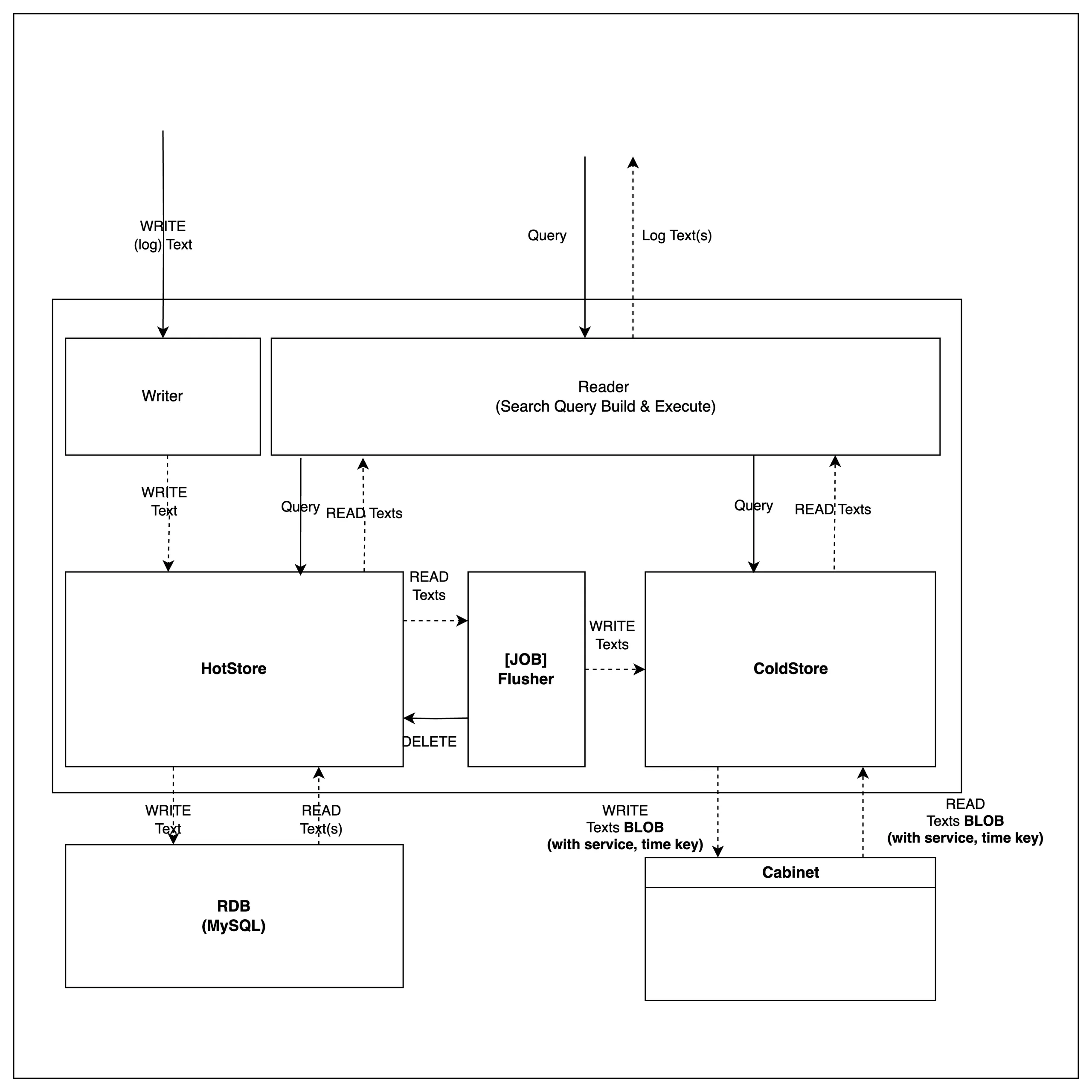
Audit logs are immutable after being stored and do not require explicit deletion. Therefore, the system provides functionality for storage and retrieval only.
Ingestion (WRITE)
Logs are initially stored in a high-performance HotStore.
After a specific period, logs are aggregated and transferred to a ColdStore for long-term storage.
Retrieval (READ)
Logs can be queried based on time ranges.
The retrieval process is abstracted, ensuring consistent querying across internal storage layers.
Efficient Storage Using Blob Storage
Logs moved to ColdStore are stored in Blob format, integrated with object storage solutions like S3. This ensures:
WORM (Write Once Read Many) compliance for secure, immutable log storage.
Efficient storage and retrieval without post-ingestion modifications.
Partitioning for Querying and Integration
For audit logs, the log group name and chronological time information are the most essential details for retrieving audit logs.
To optimize retrieval and external integration, a path-based partitioning system—commonly used for large-scale log data storage and querying—has been implemented.
collection=${COLLECTION}/date=${DATE}{HOUR}.gzLog group name
${COLLECTION}
Time
${DATE}: Date of log storage.
${HOUR}: Hour of log storage.
Example
collection test-log
Logs from 2024-01-01T19:00:00 to 2024-01-02T01:00:00 (UTC) are stored as:
Collection | Date | Hour |
|---|---|---|
collection=test-log/ | date=2024-01-02/ | 01.gz |
02.gz | ||
date=2024-01-01/ | 23.gz | |
22.gz | ||
21.gz | ||
20.gz | ||
19.gz |
The path-based partitioning method above enables efficient querying of log data in external OLAP storage.
The following example demonstrates how to query and analyze Diary logs stored in S3 directly using Athena.
Athena Integration and Query Example
Example: Creating a Table for Diary Logs Stored in S3 Using Athena:
CREATE EXTERNAL TABLE test_log ( `record_uuid` STRING, `created_at` STRING, `data` STRUCT< msg: STRING, time: STRING, level: STRING, request_id: STRING, operation_id: STRING > ) PARTITIONED BY ( `date_created` STRING ) ROW FORMAT SERDE 'org.openx.data.jsonserde.JsonSerDe' STORED AS INPUTFORMAT 'org.apache.hadoop.mapred.TextInputFormat' OUTPUTFORMAT 'org.apache.hadoop.hive.ql.io.HiveIgnoreKeyTextOutputFormat' LOCATION 's3://${S3_BUCKET_ROOT_PATH}/collection=test-log/' TBLPROPERTIES ( 'classification' = 'json', 'compressionType' = 'gzip', 'projection.enabled' = 'true', 'projection.date_created.type' = 'date', 'projection.date_created.format' = 'yyyy-MM-dd', 'projection.date_created.interval' = '1', 'projection.date_created.interval.unit' = 'DAYS', 'projection.date_created.range' = '2024-12-01, NOW', 'storage.location.template' = 's3://${S3_BUCKET_ROOT_PATH}/collection=test-log/date=${date_created}/' );