QueryPie’s DevSecOps Pipeline: Proven to Enhance Development Speed and Stability
November 22, 2024
Overview
Security-Integrated QueryPie Pipeline
At QueryPie, we prioritize both fast development speed and stability. Our team is committed to rapid growth and agility in responding to changes. However, one crucial aspect we cannot overlook is security. In the early stages, we often found that increasing development speed led to security reviews being pushed back or overlooked. This resulted in security vulnerabilities being discovered post-launch, leading to urgent patches, high costs, and potential damage to brand trust.
DevSecOps is the approach we use to fundamentally address these issues. By integrating security into the development (Dev) and operations (Ops) processes, we ensure that security is automated and standardized from the early stages of development through to production. QueryPie has implemented a pipeline that seamlessly integrates security throughout the entire process.
QueryPie’s Security Review Process Across All Development Lifecycle Phases
As a Privileged Access Management (PAM) solution, QueryPie provides high levels of security to protect critical assets and data through its products: Database Access Controller (DAC), System Access Controller (SAC), and Kubernetes Access Controller (KAC). To ensure thorough security management, QueryPie performs consistent security reviews and checks across the entire development lifecycle. From the initial requirements phase, through design, implementation, testing, deployment, and operations, we apply multi-layered security review processes at each stage to prevent potential security threats in advance.
To achieve this, we have adopted the DevSecOps approach, which tightly integrates development and security. With automated security testing and continuous monitoring, we quickly identify and address vulnerabilities, enhancing both the stability and trustworthiness of our products. For us, security is not just a feature; it is a core element of our products.
The Necessity of DevSecOps and Security Challenges in Cloud Environments
Traditional security approaches often conduct security reviews after development is completed, which typically leads to long delays and high costs when issues arise. For example, fixing a security vulnerability discovered after the code is finished requires reanalyzing and modifying the already developed code or system architecture. This is far more complex and costly than addressing issues found at the initial stages.
However, DevSecOps can address these problems by integrating security early in the development process. Through automated security reviews and periodic, continuous security checks, QueryPie can maintain development efficiency while providing a secure cloud environment. Furthermore, in cloud environments, where infrastructure management is highly automated, security vulnerabilities are at risk of being exposed quickly. Therefore, QueryPie’s DevSecOps pipeline is continuously improving to tackle the various security challenges inherent in cloud environments and ensure secure product operations.
Ensuring Trust through QueryPie’s DevSecOps Pipeline
Through the DevSecOps pipeline, QueryPie automates security, proactively addresses security challenges in cloud environments, and aims to establish itself as a trusted PAM solution. This white paper will explain in detail how security throughout QueryPie’s development lifecycle and the implementation of its DevSecOps pipeline contribute to the reliability of the product.
CI/CD Pipeline Setup and Automation
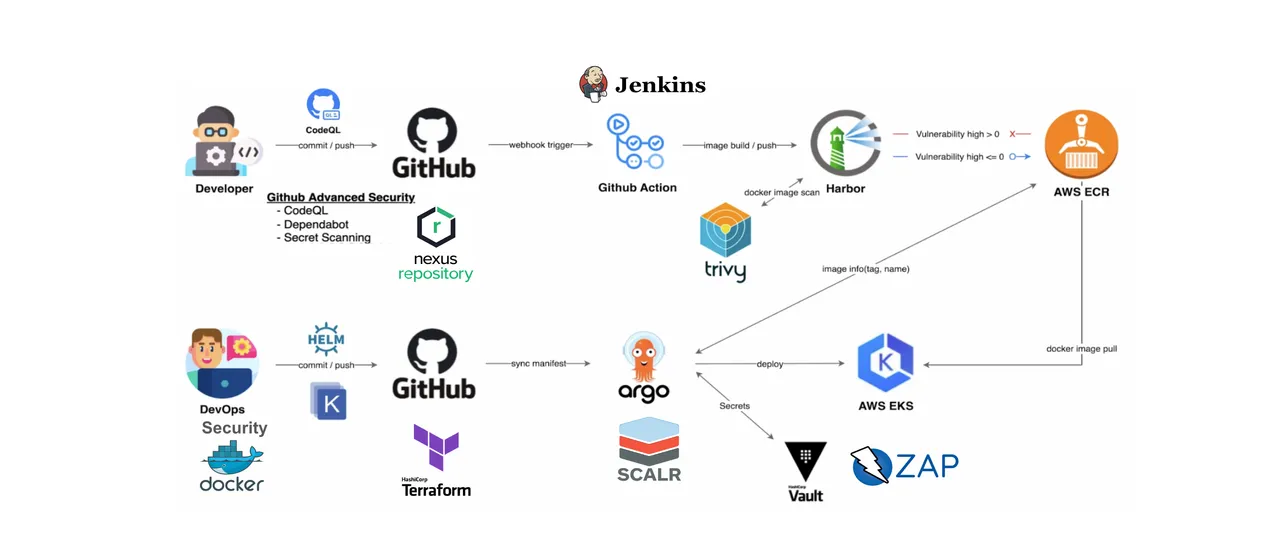
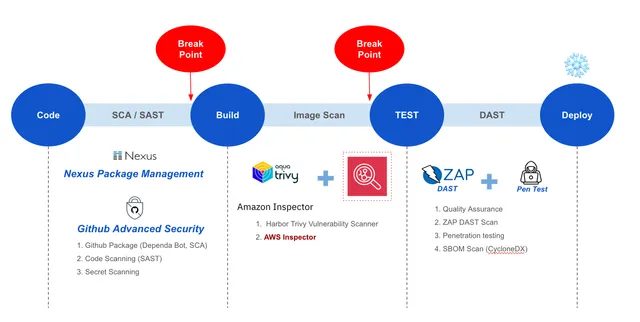
In QueryPie, the CI/CD pipeline is built using Github Action, with security checkpoints placed at each stage to automatically conduct security inspections. Through vulnerability assessments at each stage, if vulnerabilities of Medium severity or higher are found, progress to the next stage is controlled until the vulnerabilities are addressed. The types of vulnerabilities managed are shown in the image below, demonstrating the management process of checking, identifying, and removing various types of vulnerabilities throughout all stages of the CI/CD pipeline.
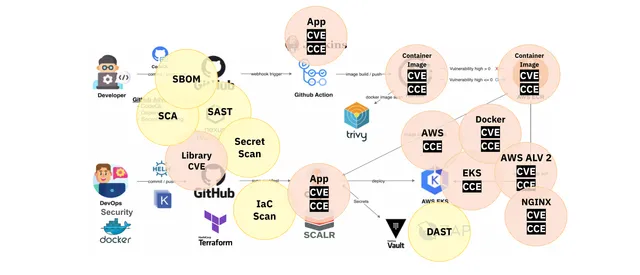
QueryPie DecSecOps Steps
STEP 0) Manage deployment images as clean, vulnerability-free golden images.
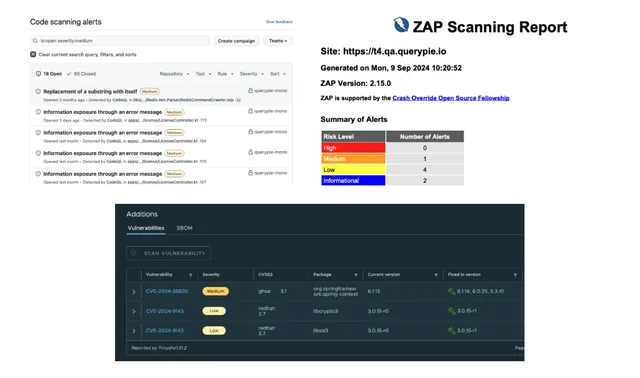
STEP 1) Perform SCA and SAST to assess source code vulnerabilities and open-source dependencies.
STEP 2) Scan vulnerabilities in the container images that are being deployed.
STEP 3) Perform DAST and penetration testing to check for application vulnerabilities.
Golden Image Management
At QueryPie, we separate the images used for customer deployments and internal testing.
Each image is created and managed as a Golden Image that removes CIS Benchmark Level 1 and CVE vulnerabilities, and no other images are allowed for use.
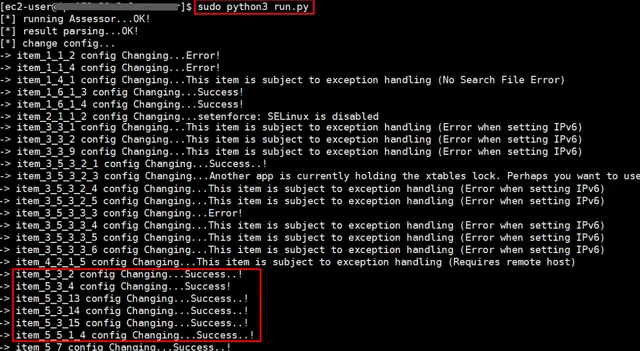
Image hardening is performed using scripts created by our security team to remove CIS Benchmark Level 1 and CVE vulnerabilities.
Below are the CIS Benchmark checks for OS Image Hardening.
Category | Check Items |
|---|---|
1. Initial Setup | 1.1 Filesystem 1.2 Configure Software and Patch Management 1.3 Configure Secure Boot Settings 1.4 Configure Additional Process Hardening 1.5 Mandatory Access Control 1.6 Configure Command Line Warning Banners |
2. Services | 2.1 Configure Time Synchronization 2.2 Configure Special Purpose Services 2.3 Configure Service Clients |
3. Network Configuration | 3.1 Configure Network Devices 3.2 Configure Network Kernel Modules 3.3 Configure Network Kernel Parameters 3.4 Configure Host Based Firewall |
4. Access, Authentication, | 4.1 Configure Job Schedulers 4.2 Configure SSH Server 4.3 Configure Privilege Escalation 4.4 Configure Pluggable Authentication Modules 4.5 User Accounts and Environment |
5. Logging and Auditing | 5.1 Configure Logging 5.2 Configure System Accounting (auditd) 5.3 Configure Integrity Checking |
6. System Maintenance | 6.1 System File Permissions 6.2 Local User and Group Settings |
Based on the above check items, we write and run a Remediation Script as follows and automatically adjust the configuration.
Code Security Inspection and Dependency Management
The SAST (Static Application Security Testing) tools used to identify security vulnerabilities in the development source code often do not provide sufficient coverage with just the default detection rules provided by the vendor. Below is an example of the vulnerability detection results using the basic detection rules on publicly available sample code containing vulnerabilities.
package ai.qwiet.springbootkotlinwebgoat import org.springframework.http.HttpHeadersimport org.springframework.web.bind.annotation.GetMappingimport org.springframework.web.bind.annotation.RequestParamimport org.springframework.web.bind.annotation.RestControllerimport org.springframework.http.HttpStatusimport org.springframework.http.ResponseEntityimport java.io.InputStreamReaderimport java.io.BufferedReaderimport java.io.Fileimport mu.KotlinLoggingimport org.apache.logging.log4j.LogManager @RestControllerclass HelloController { val logger = KotlinLogging.logger {} val secondaryLogger = LogManager.getLogger() @GetMapping("/") fun index(): String { return "Greetings from Spring Boot!" } @GetMapping("/greet") fun greet(@RequestParam("username") username: String): String { logger.info { "Got request for `/greet`" } // vulnerability: Sensitive Data Leak secondaryLogger.debug("Params for `/greet `: $username") // vulnerability: XSS return "Greetings ${username}!" } fun parseParams(name: String, msg: String): Map { val checkedName = name.takeUnless { it contains '\\' }?.ifBlank { "default_name" } val checkedMsg = msg.ifBlank { "default_msg" } return mapOf("parsed_name" to checkedName, "parsed_msg" to checkedMsg) } @GetMapping("/exec") fun exec(@RequestParam("cmd") cmd: String): ResponseEntity { logger.info { "Got request for `/exec`!" } secondaryLogger.debug("Params for `/exec`: $cmd") var out = "NOP" if (cmd != "nop") { // vulnerability: Remote Code Execution val proc = Runtime.getRuntime().exec(cmd) val lineReader = BufferedReader(InputStreamReader(proc.getInputStream())) val output = StringBuilder() lineReader.lines().forEach { line -> output.append(line + "\n") } out = "Did execute command `$cmd`, got stdout: $output" } return ResponseEntity(out, HttpStatus.OK) } @GetMapping("/touch_file") fun touchFile(@RequestParam("name") name: String, @RequestParam("msg") msg: String): ResponseEntity { logger.info { "Got request for `/touch_file`!" } secondaryLogger.debug("Params for `/touch_file`: $name | $msg") if (name.length < 3) { logger.warn { "The provided name is very short!" } } if (name == null || msg == null) { return ResponseEntity("The `name` & `msg` parameters have to be set.", HttpStatus.OK) } else { val parsedParams = parseParams(name, msg) val fullPath = "/tmp/http4kexample/" + parsedParams["parsed_name"] val finalMsg = "MESSAGE: " + parsedParams["parsed_msg"] // vulnerability: Directory Traversal File(fullPath).writeText(finalMsg) return ResponseEntity("Did write message `$finalMsg` to file at `$fullPath`", HttpStatus.OK) } } @GetMapping("/debug") fun debug(@RequestParam("url") url: String): ResponseEntity { logger.info { "Got request for `/debug`!" } secondaryLogger.debug("Params for `/debug`: $url") val headers = HttpHeaders() headers.add("Location", url) // vulnerability: Open Redirect return ResponseEntity(headers, HttpStatus.FOUND) } @GetMapping("/render_html") fun renderHtml(@RequestParam("name") name: String): ResponseEntity { logger.info { "Got request for `/render_html`!" } secondaryLogger.debug("Params for `/render_html`: $name") // vulnerability: XSS val out = StringBuilder().append("<h1>Hello there, ").append("$name").append("!</h1>").toString() return ResponseEntity(out, HttpStatus.OK) } @GetMapping("/add") fun add(@RequestParam("x") x: String, @RequestParam("y") y: String): ResponseEntity { logger.info { "Got request for `/add`!" } secondaryLogger.debug("Params for `/add`: $x | $y") val xi = x.toInt() val xy = y.toInt() val out = (xi + xy).toString() return ResponseEntity(out, HttpStatus.OK) }}