Optimal Method for Using a Terminal with Seamless SSH Connection
March 10, 2025
Preface
What is the biggest issue with traditional access control solutions? Most solutions require users to install a separate agent on their PC and connect to servers exclusively through a GUI-based interface. This approach significantly disrupts the workflow of developers and system administrators who are accustomed to a CLI environment. If they are forced to abandon their efficient workflows—leveraging shortcuts and scripts—in favor of GUI-based access, productivity is bound to suffer.
To address this problem, QueryPie developed Seamless SSH Connection. This approach ensures security while allowing users to maintain their familiar SSH workflows. By making minor modifications to the SSH configuration file, users can apply access control without sacrificing their preferred CLI environment—this is the core advantage of our solution.
Host *.querypie.io Port 22 ProxyCommand qpa ssh %r %h %pOnce this configuration is set up, users can connect to target servers using the same SSH commands they are already familiar with:
ssh ryan@test.querypie.ioHow Seamless SSH Connection works
To understand how Seamless SSH Connection functions, it's essential to first grasp the concept of SSH ProxyCommand.
SSH ProxyCommand
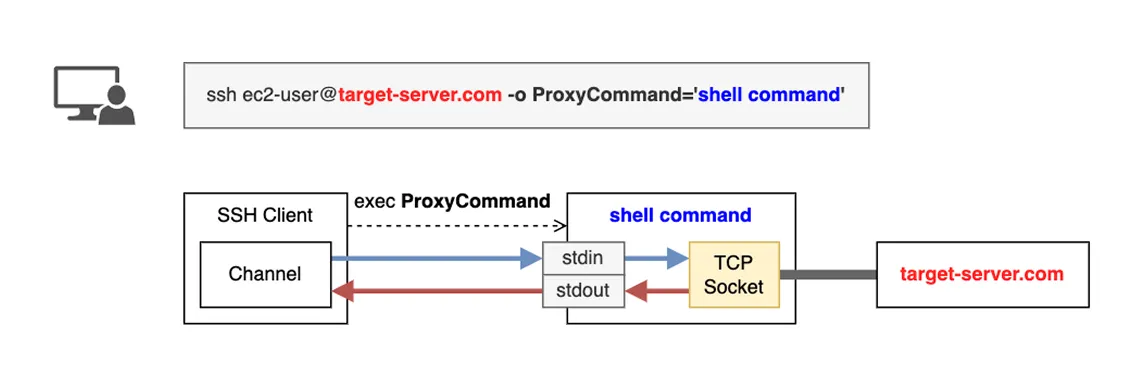
ProxyCommand is a method that routes SSH connections through an intermediary server before reaching the final destination. This feature can be specified in the SSH client configuration, where the SSH client executes the command set in ProxyCommand to establish communication with the target server.
How It Works
User Execution: When a user attempts to connect to a remote server via SSH, the SSH client first checks whether a
ProxyCommandis configured. If aProxyCommandis set, the SSH client executes the specified command before establishing a direct connection to the target server.Data Stream Connection:
stdin: The SSH client sends data through the stdin of the
ProxyCommandprocess. This data can include user commands or file transfer requests.stdout: The
ProxyCommandprocess manages the connection to the target server and relays the response back to the SSH client via stdout. This allows the user to see the server’s output as if they were directly connected.
Bidirectional Data Transmission:
ProxyCommandtransmits user input from stdin to the target server. The target server's response is received and returned to the SSH client via stdout. This effectively establishes a bidirectional communication channel between the SSH client and the target server.
Special Variables Used in ProxyCommand
%r→ The username specified in the SSH command.%h→ The target server address specified in the SSH command.%p→ The target server port specified in the SSH command (default: 22, unless overridden with -p).
QueryPie Agent - CLI Extension
In Seamless SSH Connection, the qpa command used in ProxyCommand is an extended CLI version of the QueryPie Agent, a client-side agent that enables SSH access through QueryPie. The SSH client’s connection is tunneled through the Agent, allowing user authentication via the QueryPie system.
Connection Structure
SSH Client → Agent CLI → ARiSA Proxy Server → Target Server
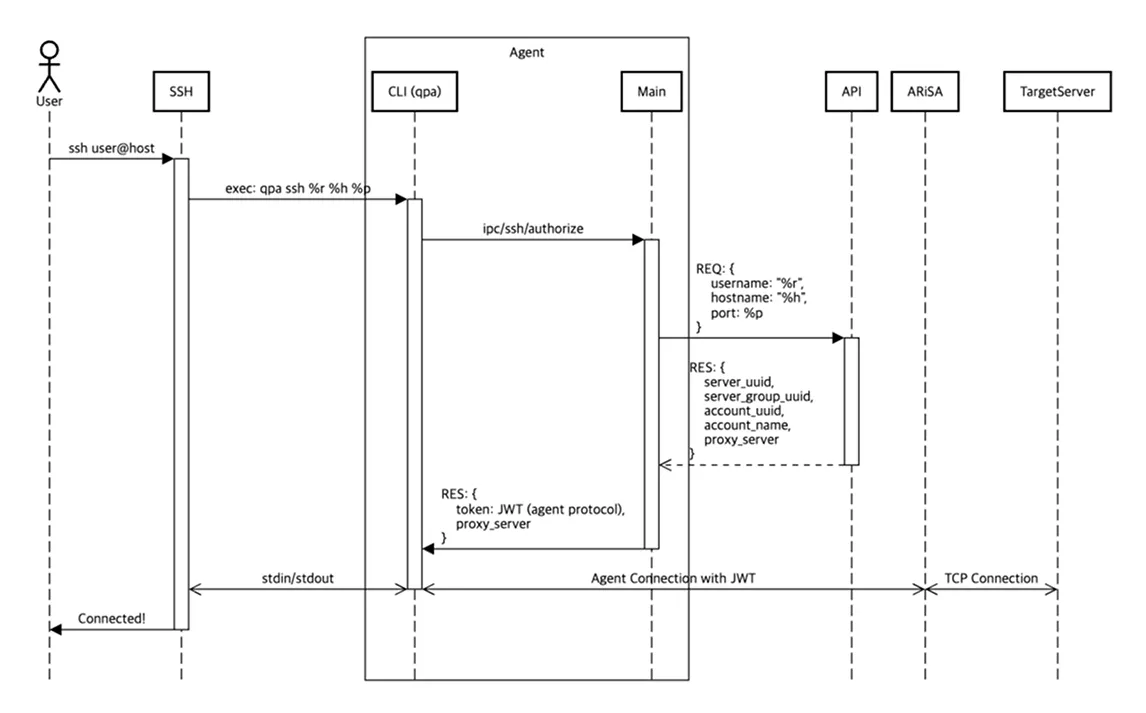
Component Overview
Component | Description |
|---|---|
SSH | OpenSSH client. |
Agent - CLI ( | A shell command executed via ProxyCommand. Referred to as SubProcess within the agent, it implements IPC communication for messaging with MainProcess. |
Agent - Main | A user agent that handles login, tunneling, and UI-based execution. |
API | Implements and provides services defined in agentService.proto. |
TargetServer | The destination server (e.g., |
Usage Example
With Seamless SSH Connection, server developers can continue using familiar techniques even in an environment with access control solutions.