Revolutionizing Security Management with Policy as Code (PaC)
November 22, 2024
In today’s digital landscape, organizations must rigorously manage secure access to a wide range of resources, including databases, servers, Kubernetes clusters, and web applications.
However, manually handling security in such complex environments, especially with frequent policy updates, can lead to security vulnerabilities.
Missing policy change logs, unclear accountability, and inefficient approval processes are common causes behind security incidents.
To address these challenges, QueryPie has adopted the Policy as Code (PaC) approach.
PaC allows security policies to be managed as code, ensuring that changes are transparently recorded and approval workflows are strengthened.
This approach not only enforces consistency in policies but also enhances security by ensuring that only validated and compliant policies are applied to production environments.
In this technical white paper, we will dive into how PaC eliminates blind spots in security management and makes policy configuration and administration easier and more reliable.
We will also explore the role of real-time validation and intuitive authoring tools in empowering administrators to effectively manage security policies with confidence.
What is Policy as Code (PaC)?
In resource management, policies define the rules for accessing specific resources and outline permitted or prohibited actions.
For instance, a policy might prohibit the use of sudo commands on all servers. However, even with such straightforward rules, errors during management are highly likely.
Additionally, tracking and managing the history of policy changes can be challenging.
Policy as Code (PaC) is a systematic approach to addressing these issues.
It incorporates a code-based management style for policies, ensuring consistency in their creation and documentation.
Policies are written in formats like YAML, which uses a key-value structure for improved readability.
Furthermore, policy change histories can be tracked using code management practices, providing a transparent and reliable system for policy updates and revisions.
PaC Editor
When administrators write policies in YAML format, they may face challenges if they lack YAML knowledge or fail to fully understand the scope of the policy configurations.
These issues can lead to difficulties in management and, more critically, errors that are only discovered after the policy is applied, resulting in a suboptimal administrative experience.
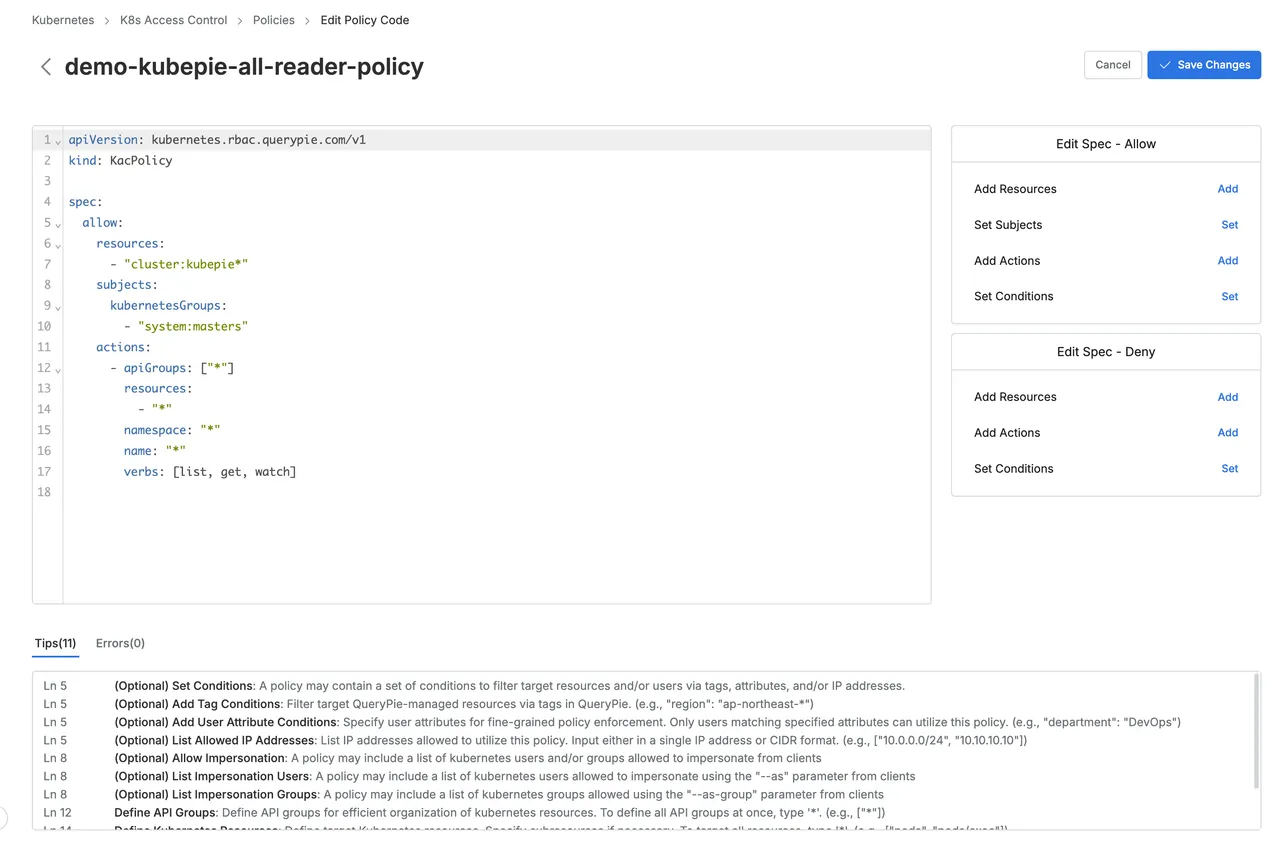
QueryPie’s PaC Editor addresses these challenges by utilizing JSON Schema to define policies and offering a real-time validation interface.
The PaC Editor achieves the following key objectives:
Real-Time Validation and Error Prevention: With real-time validation, users can immediately identify errors, preventing mistakes during the writing process.
Automated Suggestions: By providing predefined formats and suggested options, the PaC Editor helps ensure that policies are created correctly and efficiently.
How the PaC Editor Works: Parse, Assist, Validate
The PaC Editor operates through three key stages: Parse, Assist, and Validate.
Below, each stage will be explained in detail, accompanied by illustrative examples or diagrams.
Parse: YAML Parsing
The Parse stage is a critical step where YAML-formatted policy data entered by the user is converted into a JavaScript Object, ensuring the syntactic consistency of the input.
In this stage, the yaml JavaScript library is used to parse the YAML document.
It not only processes the document but also tracks the location of each element, mapping this information to the converted object.
This process serves as a foundational step for the subsequent Assist and Validate stages.
Detailed Process
YAML Document Syntax Analysis
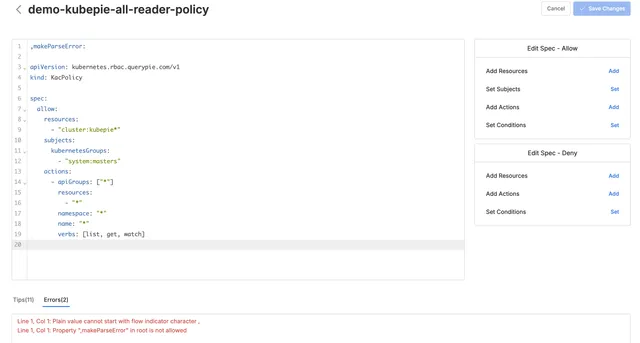
The text entered by the user in the Editor is parsed using the yaml library to verify its compliance with YAML syntax.
YAML is more readable and provides concise structural expressions compared to JSON.
However, strict syntax rules, such as indentation, must be followed.
The yaml library checks for syntax errors or inconsistencies and, if any issues arise, generates error messages to provide immediate feedback to the user.
Conversion to JavaScript Object
After passing the syntax check, the YAML data is converted into a JavaScript Object.
This object is now in JSON format, making it suitable for further validation using JSON Schema in subsequent stages.
Tracking and Mapping Location Information
In this stage, the position (location) of each element in the YAML document is tracked and mapped to the corresponding fields within the JavaScript Object.
The location information plays a crucial role in providing feedback to the user.
In case of errors, the system can pinpoint the exact location and the root cause of the issue, making it easier for administrators to resolve problems efficiently.


Importance of the Parse Stage
The Parse stage plays a crucial role in the operation of the Policy as Code Editor.
By accurately parsing the data and capturing location information, this stage ensures that the policy is free from syntactical errors, allowing for smooth validation in the subsequent stages.
PaC Schema
The Assist and Validate stages in the PaC Editor are based on PaC Schema, an extension of JSON Schema, providing users with an intuitive and precise policy writing experience.
First, let's briefly explain the role and necessity of JSON Schema, followed by a detailed discussion of the extensions made in PaC Schema and how each stage works with it.
What is JSON Schema?
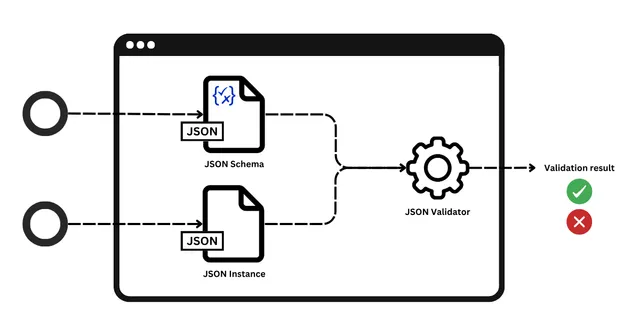
JSON Schema is a standard that defines the structure, required fields, and data types of JSON data, enforcing consistency in the data format.
It is widely used in various contexts, including API responses, configuration files, and policy management.
Below are the key features of JSON Schema: