Access Control for Secure Operation of Kubernetes Clusters
November 22, 2024
Introduction
With the increasing use of Kubernetes clusters, the importance of access control for enhancing security and operational efficiency is becoming more prominent.
However, the Role-Based Access Control (RBAC) feature provided by Kubernetes is often underutilized due to its complexity in setup and management.
As a result, many organizations share Admin privileges among multiple users, which can escalate security risks and lead to operational issues.
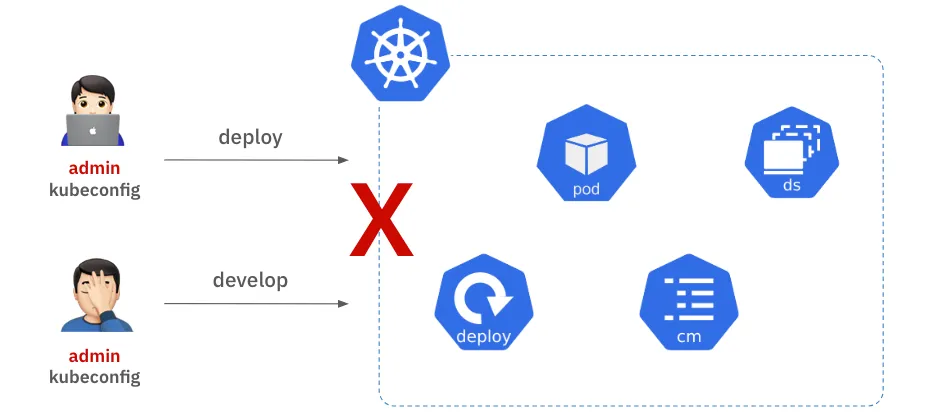
Shared Admin privileges grant unlimited access to all users, increasing the risk of accidental deletion or modification of resources.
This can lead to service disruptions, and in the event of an issue, it becomes difficult to track who performed which action.
Therefore, establishing clear access control policies for each user is essential for the safe and efficient operation of Kubernetes clusters.
Although Kubernetes RBAC is considered for access control, many organizations struggle to adopt it due to various limitations in functionality and management complexities.
What challenges does Kubernetes RBAC pose, and how can they be addressed to ensure safer use of Kubernetes clusters?
In this document, I will introduce the features of our Kubernetes access control product, which was developed to resolve these issues, as well as the technologies we used during development.
Challenges
Kubernetes already has a built-in access control feature based on roles, called RBAC (Role-Based Access Control).
By using Kubernetes RBAC, you can naturally divide access rights for each resource within the cluster by creating roles and assigning them only to the users who need those permissions.
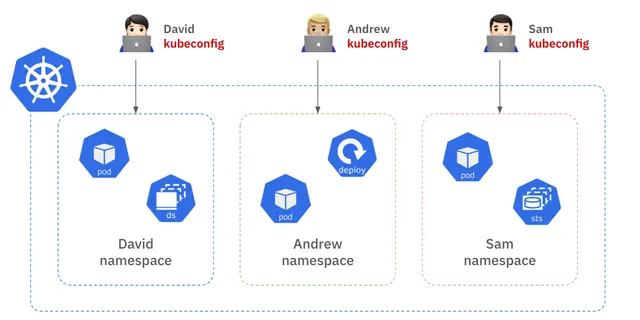
For example, you can allocate separate namespaces within the cluster for each user, and each user can only access resources within their own namespace.
To implement this, you need to generate a kubeconfig file for each user, containing their authentication information, and distribute it to the respective users.
As illustrated in the diagram, David can only access resources in the "David" namespace, and similarly, Andrew and Sam can only access resources within their own namespaces.
By managing separate kubeconfig files for each user, permission management and resource collision issues within the cluster can be largely addressed.
However, does implementing Kubernetes RBAC make operations easier?
In reality, when you talk to people who have actually implemented Kubernetes RBAC, they often mention several inconveniences.
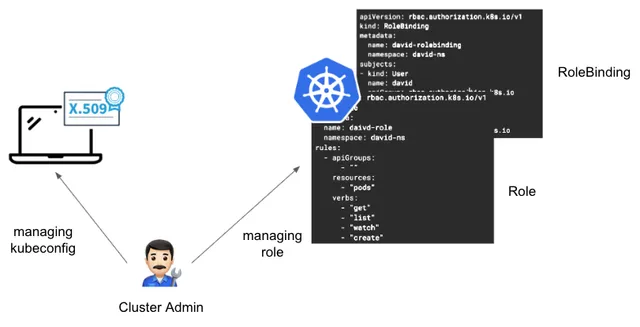
What difficulties might arise? Let's start by considering the management of kubeconfig. When applying Kubernetes RBAC for each user in a cluster, the cluster administrator has more tasks than expected. First, they need to define the Role specifications, detailing what actions can be performed on which resources. Then, they must bind the Role to the users via RoleBinding. In addition, to ensure users can access the cluster with that Role, the administrator must create a kubeconfig for each user using X.509 certificates or token methods. In other words, the cluster administrator is responsible for managing each user and each Role specification individually.
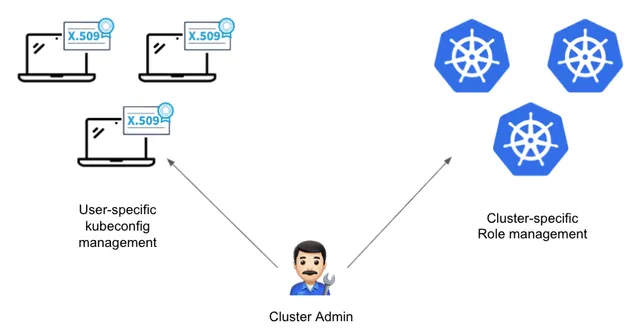
As the scale of the service grows, there is an increasing number of organizations that manage multiple clusters. What happens when the number of clusters to be managed increases? The cluster administrator will need to create Role specifications, bind roles, and manage user-specific kubeconfigs for each cluster as mentioned earlier. As the number of clusters and users increases, the operational resources required will inevitably grow.
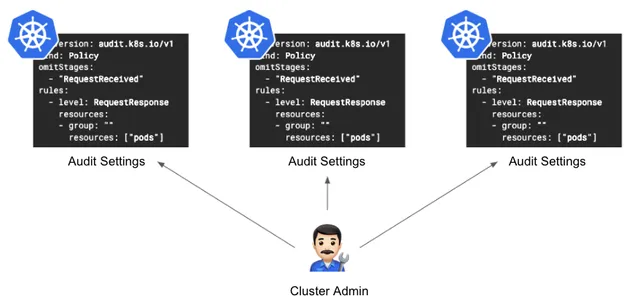
How should audit logs be managed? Kubernetes audit logs record who accessed which resources and when. In order to keep audit logs, the cluster administrator has to configure audit settings for each cluster, which can be a burden. Additionally, if an audit requires tracking the actions of a specific user, the administrator would need to search the audit logs for each cluster individually. This creates challenges in both configuring the audit logs and managing the log data.
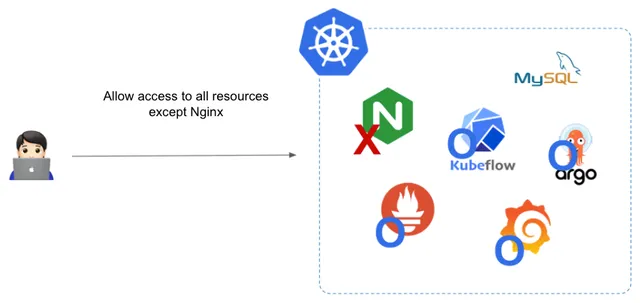
Kubeconfig and audit log management are not the only challenges. There are some shortcomings in Kubernetes RBAC. One of them is that Kubernetes RBAC specifications do not support Deny rules. For example, let's assume that you want to give a user access to all resources except for the nginx pod. How would you set up the Kubernetes RBAC Role configuration in this case?
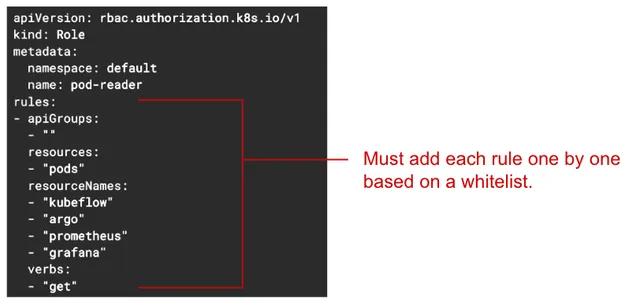
Kubernetes Role specifications only support Allow rules, so as shown in the image, you must add the names of all resources except nginx to the Role specification one by one.
If there are only 3 or 4 resources to add, it's manageable, but what if there are 10 or 20 resources? And what if resources are frequently added or deleted? Managing the Role specifications every time would increase the operational burden.
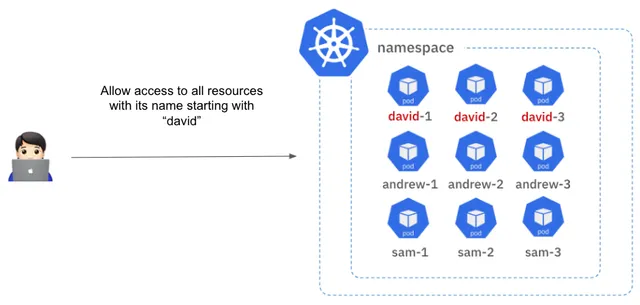
The second issue is that RBAC does not support pattern matching when configuring. For example, let's assume there are multiple pods whose names start with "david." In this case, if you want to grant access only to the pods starting with "david" to a user, how would you do it?
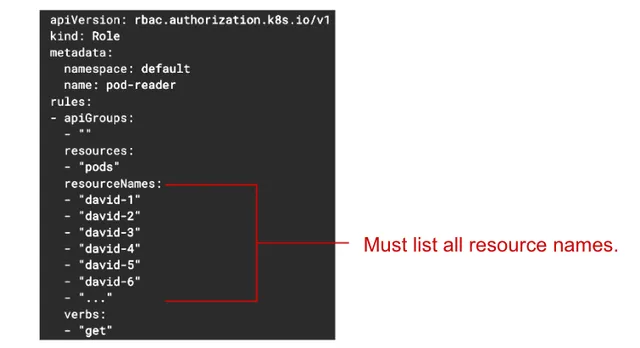
Unfortunately, the current Kubernetes Role specification does not support pattern matching when adding resource names. In other words, there is no way to specify pods starting with "david" using a pattern. As you can see, you would have to add each pod name individually, such as "david-1," "david-2," "david-3," and so on. This is another cumbersome part for the cluster administrator.
Additionally, Kubernetes access control features have limitations, such as complex configurations when wanting to use both RBAC and ABAC simultaneously, or the inability to filter and show only the pods the user has access to when listing pods.
Goals
Therefore, the goal was set to develop a Kubernetes access control product that would complement the lacking basic Kubernetes RBAC features and reduce the cluster administrator's burden of access control management. Additionally, when introducing this new Kubernetes access control product, the goal was to maintain the existing usability of Kubernetes so that users would not feel resistance to its adoption.
Solution Overview
The Kubernetes Access Controller (hereinafter referred to as KAC) works by placing a KAC Proxy server between the client and the Kubernetes API server to manage access control.
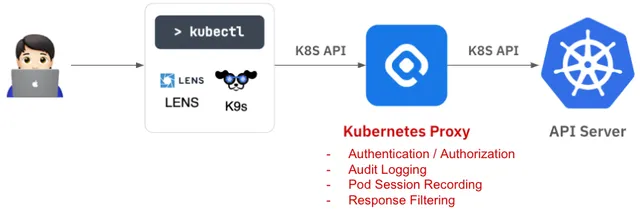
The system operates by intercepting Kubernetes API requests from the client to the Kubernetes API server.
After intercepting the API call, it analyzes the request to determine what resource and action are being attempted and checks if the user has the required permissions for that action. Additionally, KAC provides an audit log feature by default, recording who did what, when, and on which resource, for future auditing purposes.
Depending on the type of API request, KAC offers several additional features.
For example, if the request involves Pod exec, like accessing a container, it records the commands entered and the outputs in the container, enabling later playback. If the request is to list Pods, it filters the Kubernetes API server's response so that users can only see Pods they have permissions to access. Importantly, these features are implemented in a way that users can continue using their existing Kubernetes client tools as they did before. To achieve this, the KAC Proxy server is designed to be transparent, so that users are unaware of the KAC Proxy server's presence from the client tool's perspective.
Technical Description
Let's break down how the KAC access control functionality works from a technical perspective, step by step. Essentially, the KAC Proxy server is responsible for granting or blocking access to resources within the cluster.
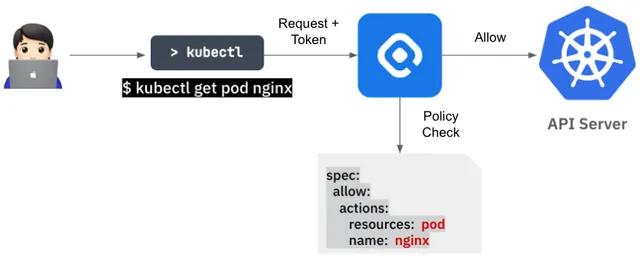
When a client sends a request, the KAC Proxy server checks whether the client has the appropriate permissions for that request. Depending on the policy check results, if the client has the required permissions, the KAC Proxy forwards the request to the Kubernetes API server. If the client doesn't have the required permissions, the server returns an error message indicating that the client doesn't have access rights.